
01
Captured, not guessed
We ran thousands of test signals and vocal takes through the analog unit at fixed settings (4:1 ratio, attack 3, release 7 (fastest)) and recorded exactly what came out.
Free plugin · Debut release
Aggressive FET compression that pushes a vocal to the front of the mix, with the grit of a driven output transformer. We modelled it from one analog unit and packed it into a free plugin. No iLok, no account, no trial.
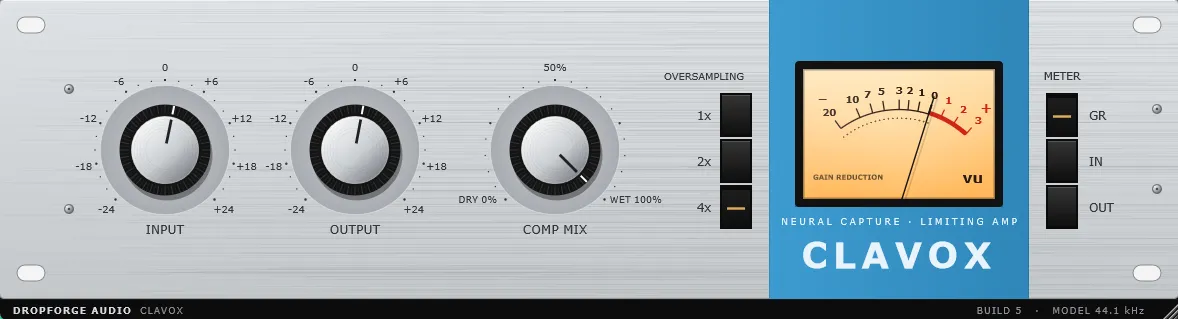
On the faceplate
Fixed inside
Ratio 4:1 · Attack 3 · Release 7 (fastest)
Recommended setup
Session sample rate
44.1 kHz
Clavox’s native rate. The model was trained on 44.1 kHz audio, and that’s where its latency is lowest (0.86 ms). It still runs accurately at every other sample rate, from 48 kHz up to 192 kHz, so you don’t need to change your session to use it.
Oversampling
4×
Set the oversampling buttons to 4× for the cleanest saturation with the least aliasing.
Gain reduction at peaks
≈ 7 dB
With the meter on GR, turn up Input until the vocal’s loudest moments show about 7 dB of gain reduction. That’s where Clavox has the best effect. Then set Output to match the level.
How it’s modeled
We ran thousands of test signals and vocal takes through the analog unit at fixed settings (4:1 ratio, attack 3, release 7 (fastest)) and recorded exactly what came out.
A neural network learns how the hardware turns input into output: the FET gain-reduction curve, how it recovers between syllables, and the harmonics added by the output transformer.
In a 44.1 kHz session, the rate the model was trained at, Clavox adds just 38 samples (0.86 ms). At other session rates it adds about 3.1–3.2 ms. Full figures are below.
How much delay Clavox adds, by session sample rate.
| Session rate | Latency | Time |
|---|---|---|
| 44.1 kHzRecommended | 38 samples | 0.86 ms |
| 48 kHz | 154 samples | 3.2 ms |
| 88.2 kHz | ≈ 276 samples | ≈ 3.1 ms |
| 96 kHz | 301 samples | 3.1 ms |
| 192 kHz | ≈ 596 samples | ≈ 3.1 ms |
Windows
macOS
Free forever. Use it on commercial releases. Install it on all your Windows machines.